
QR Jockey
Q-SYS plugin that makes a UCI a support surface. A scannable trouble-report QR for offline systems, a one-press emailed trouble report for online ones, a component status sweep, and Wi-Fi, UCI link and custom QR codes.
Q-SYS Designer name: Fresh AV Labs~QR Jockey
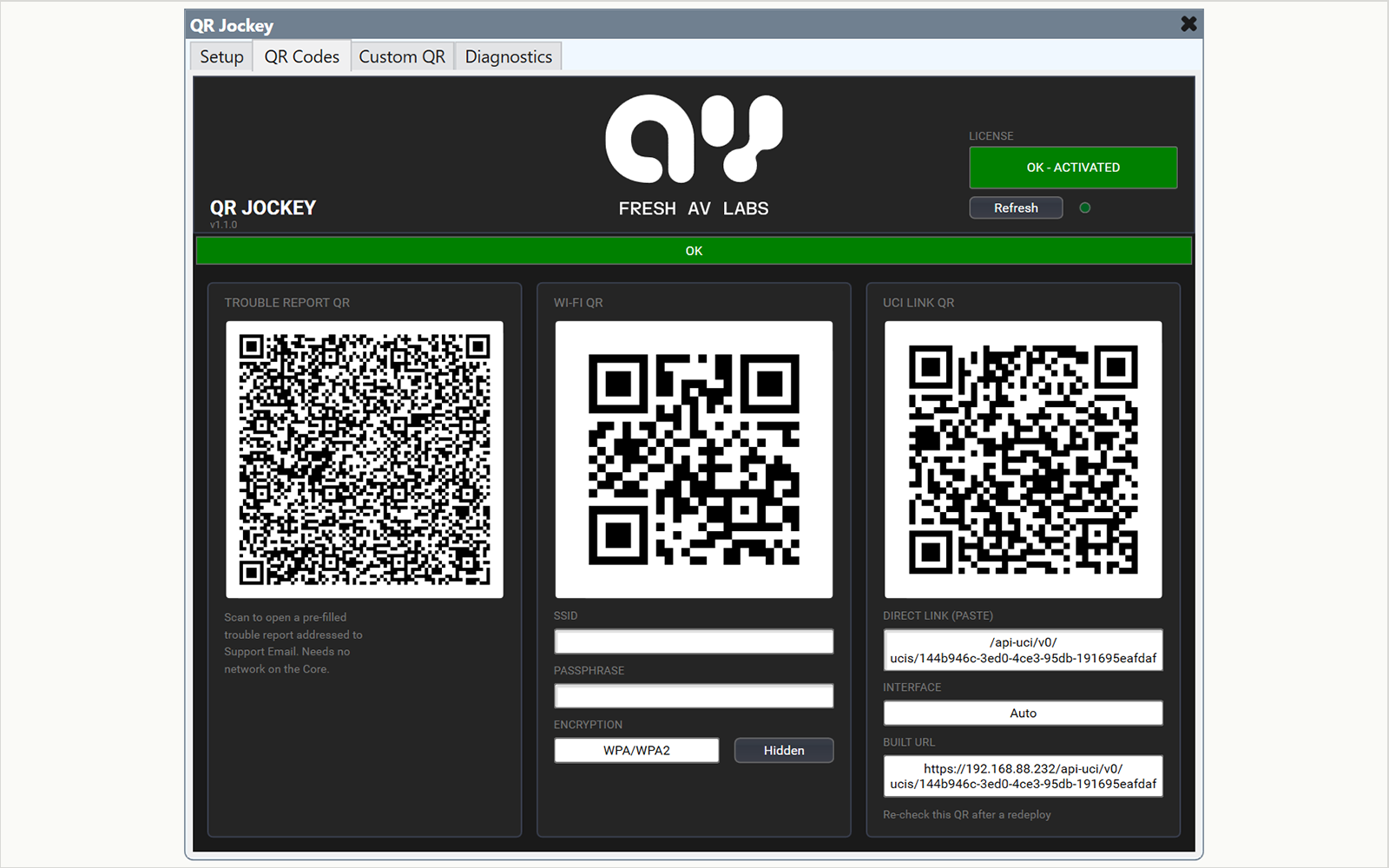
QR Jockey puts support on the UCI. A QR code opens a pre-filled trouble report on the phone that scans it, and one button emails the full report through your SMTP relay.
In Q-SYS
- A trouble report QR that carries the site, design, Core and network details and needs no network on the Core
- A Send Trouble Report button that emails the report with component status and an event timeline
- A Send Test Email button and a readout of what the Core has proved about delivery
- QR codes for Wi-Fi credentials, a UCI link and up to nine custom texts
- A status sweep of the design's components, on a 30s, 1m or 5m interval
- An external status from a Status Combiner block, or from two pins
Offline and online
Each support path works without the other. The QR needs no network, and an offline reading never disables the email button. Set Enable_Email_Relay to No for a system that has no use for email.
What it needs
The email relay needs a login and SMTP on port 25, and the plugin has no port setting. The reachability check uses outbound HTTPS to one Fresh AV Labs address. The plugin needs a per-Core activation code, and runs a 10-minute demo without one.
Specifications
| Trouble report | Scannable QR for offline systems, emailed report for online ones |
|---|---|
| QR codes | Trouble report, Wi-Fi, UCI link, up to 9 custom |
| SMTP relay with login, port 25 only | |
| Status sweep | Off, 30s, 1m or 5m |
| Status input | A Status Combiner block, or two pins |
| Pages | Setup, QR Codes, Custom QR, Diagnostics |
| Licensing | Per-Core activation, 10-minute demo |
Compatibility
- Tested with Q-SYS Designer 10.4
- Tested on a Core Nano
- Reachability check needs outbound HTTPS
Downloads
QR Jockey pluginv1.1.1214.6 KB
Same filename every release - the version lives inside the plugin.
DownloadDocumentation
Read the manualChangelog
v1.1.1 - Oct 13, 2026
- The Timeline survives a script restart and a Core reboot, and every line carries a date. The panel shows the time for today's lines and the month, day and time for older ones
- More events reach the Timeline: restarts, the license state at each start, changes in reach, changes of the picked status block, and Warning and Error log lines. A repeated Warning or Error folds into one line with a count
- Each block appends its Timeline to a log file on the Core, under Core Manager > Files > QRJockey. At 512 KB the file becomes the .prev.log file, replacing the older one, and a new file starts, so a block uses at most 1 MB
- The status sweep leaves the picked status block to the picker, so each block is reported once
- When the events do not fit, the emailed report drops the oldest and keeps its closing line
- The debug log at Standard prints each send and test outcome and a sweep summary. The reach check's success lines move to Verbose
v1.1.0 - Oct 9, 2026
- Pick a Status Combiner block from a dropdown on the Diagnostics page, and its status fills the external-status box, its LED, the Timeline and the emailed report with no Refresh. The StatusIn pins still work when no block is picked
- A picked block that cannot be found or read lights the external-status LED and raises the status bar to Compromised, so a renamed or deleted block shows at once
- The emailed report gains an External status line
- The Timeline no longer records External LED changes. The External Status LED pin is unchanged
- Set Enable_Email_Relay to No to use QR Jockey as a QR-only support surface. The email cards leave the Setup page and the Connected LED leaves the header
- The report's fault list now splits in two. Fault, Missing and Compromised print as ! lines, and Not Present and Initializing print as ~ lines
- Upgrade note: a component's status is now found by control name and type, which changes the sweep's coverage figures on most designs
- A component list that fails to read no longer reports 0 visible components. The report carries the last good figures and a note
- Editing Operator Notes no longer redraws the trouble report QR
- Every QR now has a four-module white border
- The Diagnostics and QR Codes pages are taller, and the status-input card is titled STATUS INPUT
- Existing control and pin names are unchanged, so existing wiring is kept
v1.0.2 - Sep 28, 2026
- The header carries the stacked Fresh AV Labs logo, centred
- A write to the Status control from outside the plugin no longer stays on the status bar. The plugin restores its own status at once
v1.0.1 - Aug 7, 2026
- QR codes now draw on a white background, so they scan on dark UCI themes
- The trouble report QR now carries only the identity header, and the emailed report carries the rest. The full-report QR was cut off on a touch panel
v1.0.0 - Aug 3, 2026
- First licensed release, with a 10-minute demo
- Trouble report QR, one-press emailed trouble report with component status and event timeline, Wi-Fi, UCI link and custom QR codes, and a reachability readout
Related plugins