
Token Control for Samsung Displays
Q-SYS plugin for Samsung commercial displays using the modern token-based authentication API. No more legacy MDC quirks.
Q-SYS Designer name: Fresh AV Labs~Token Control for Samsung Displays
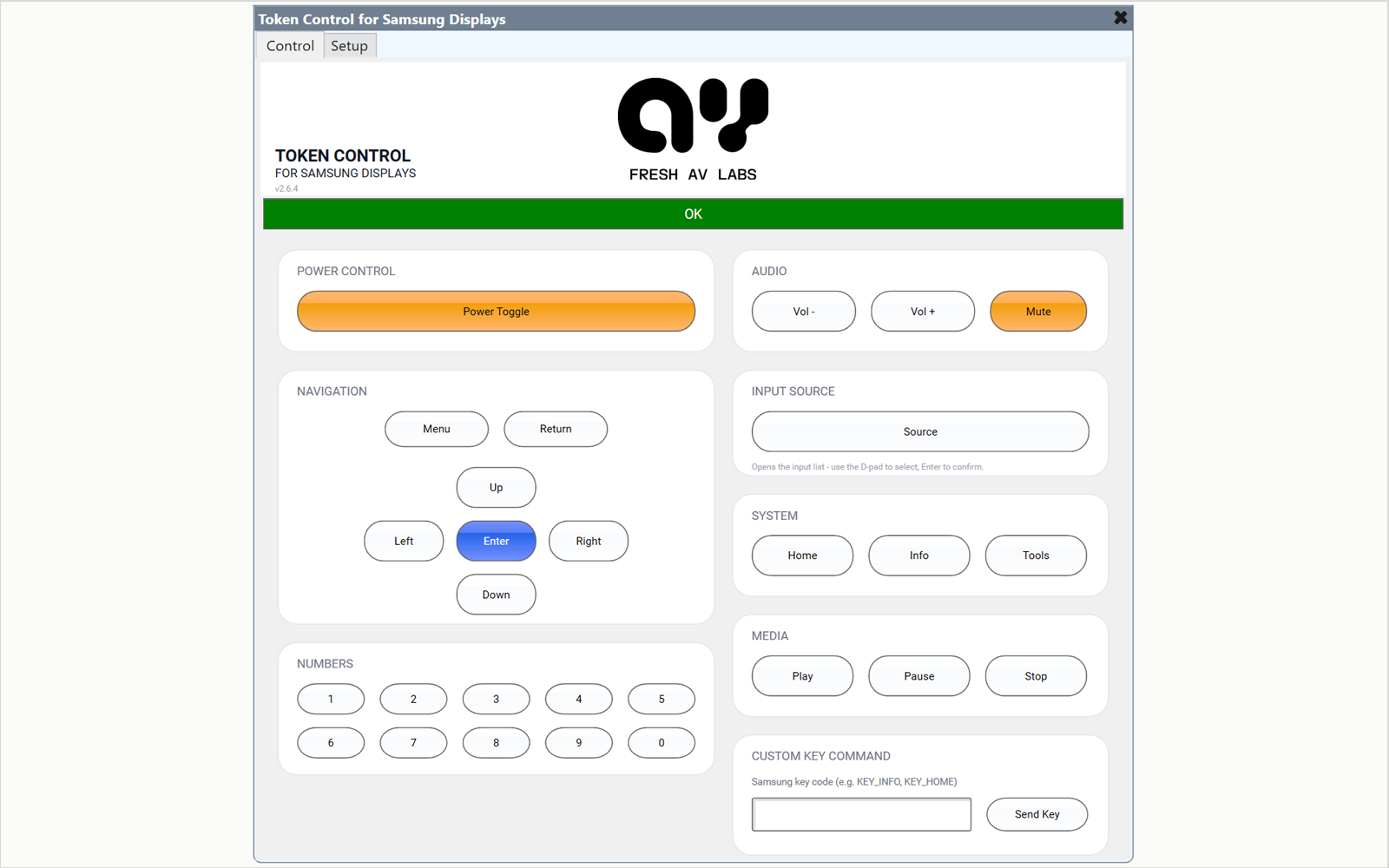
Samsung's modern commercial display API uses a per-device token issued on first connection. This plugin handles the issuance, stores the token automatically, and exposes a clean control surface with no MDC fallbacks and no manual JSON wrangling.
In Q-SYS
- Power toggle with Wake-on-LAN for power-on from standby
- Input switching via the Source key and on-screen input list (D-pad + Enter)
- Volume up / down with press-and-hold ramp, plus mute
- Full remote emulation: D-pad, Menu/Return, number keypad (0-9), system keys (Home / Info / Tools), and media transport (Play / Pause / Stop)
- Any Samsung remote key code via the Custom Key field
- On-panel Setup page - enter IP, device name and SSL right on the plugin block. The pairing token is stored automatically after approval, and the MAC address auto-fills from the display
- Config Export / Import as JSON for fast redeployment and display swaps
- Connection state, pairing status, and last-error string reported to the Core
Two-page control surface
Version 2.6 splits the plugin into a Control page (the day-to-day remote) and a Setup page (connection, pairing, licensing, and config export/import). Everything an integrator needs to configure now lives on the plugin block itself - there is no round-trip through the Properties panel to enter connection details, and the authentication token is captured and persisted for you the moment you approve the on-screen pairing prompt.
Why token, not MDC
Samsung is steadily deprecating the legacy MDC (Multiple Display Control) protocol on newer firmware. Token control is the supported, supported-going-forward path, and it works over HTTPS without bespoke serial wiring or LAN-side cleartext credentials.
Specifications
| Protocol | Token-authenticated WebSocket (WSS/WS) |
|---|---|
| Auth | First-run token issuance, auto-stored on the plugin |
| Power | Power toggle with Wake-on-LAN (MAC auto-filled from the display) |
| Input | Source key + on-screen input list (D-pad select) |
| Volume | Up / down (press-and-hold ramp), mute |
| Setup | On-panel Setup page - no Properties round-trip |
| Q-SYS firmware | 9.0 or later |
Compatibility
- Designed & tested for Samsung BE Series (Tizen OS)
- Verified on LH43BEFHLGFXGO (BE43FX-H)
Downloads
Token Control for Samsung Displays pluginv2.6.4115.5 KB
Same filename every release - the version lives inside the plugin.
DownloadDocumentation
Read the manualChangelog
v2.6.4 - Sep 15, 2026
- The Status banner now reads Not Present - Display in standby, in gray, when the display reports standby, instead of a red fault. Tested on the BE43. A display that turns its network off in standby still reads Fault - Display unreachable - check power/network between reconnect attempts.
- Connected and a green OK now mean the display's control channel is open. A display in standby that accepts the connection but ignores every key no longer reads OK.
- New banner: Fault - Display on but control channel down - check remote access setting. It shows when the display answers on the network but will not open its control channel.
- The rare Connection failed banner text is gone. That case now reads Fault - Display unreachable - check power/network.
- A rejected Auth Token now stays on the banner until the control channel opens. Clearing or changing the token, changing the IP Address, or importing a configuration also clears it.
- Remote keys are no longer sent while the control channel is closed. The debug console logs Not connected - cannot send as a warning.
- Fixed: an error the display reports now reaches the debug console with the display's own wording. It used to read TV error: Unknown.
- Fixed: a slow reconnect attempt was counted as a failure, which could send Auto Wake's wake packet one cycle early.
- With Auto Wake on, a display in standby that accepts the connection but never opens its control channel now gets a wake packet on each reconnect.
- Fixed: a connection the plugin had already replaced could overwrite the stored Auth Token or mark the live connection down.
- Fixed: after you edit the IP Address, Device Name, Use SSL or Auth Token, or import a configuration, the old connection now closes at once. Before, it stayed open for 0.75 s. A token it received could be stored, and the old token's rejection was blamed on the new one.
- Fixed: Pairing status now follows an edit of the Auth Token or IP Address, or an Import. It no longer asks you to clear an empty Auth Token field.
- Config Export and Import now include Auto Wake. A configuration exported by an older version leaves Auto Wake as it is.
- The number keys now grey out when the demo expires, like the other remote keys.
- Upgrading: install, then update the plugin in each design and push it. Updating a block keeps its Setup values, Code Name and Script Access - tested on a configured 2.6.3 block. If a script used the Connected pin to mean the display answered, read the Status control's Value instead: 0 is OK, 3 is standby, 5 is connecting, and 2 is any fault.
v2.6.3 - Sep 12, 2026
- Fixed: a display could switch itself back on about a minute after being turned off. The automatic Wake-on-LAN added in 2.5.5 cannot tell a display that was turned off from one that dropped off the network, so it woke it.
- New Auto Wake control on the Setup page, off by default. With it off, only Power Toggle wakes the display. Turn it on only where the plugin must wake a display without anyone pressing Power Toggle.
- Power Toggle now reconnects about 10 seconds after it wakes a display, so the other controls respond soon after instead of after up to a minute.
- Fixed: on Q-SYS Designer 10.4 the LOCKING ID box now labels the emulator's ID as a Designer test ID, so it can't be mistaken for a Core ID to buy a code against.
- Upgrading: install, then update the plugin in each design and push it. Every display comes up with Auto Wake off.
v2.6.2 - Sep 2, 2026
- Renamed to Token Control for Samsung Displays. The plugin block, its Q-SYS Designer entry and the download file all carry the new name - nothing about how it works has changed, and existing activation codes continue to validate.
- Before you install: delete the old Samsung_Token_Control.qplugx from your Q-SYS Designer Plugins folder. Both files carry the same plugin Id, so leaving both in place means Designer offers only one of them with no indication which.
- Plugin header refreshed with the current Fresh AV Labs logo and a two-line title.
v2.6.1 - Jul 10, 2026
- MAC address now auto-fills on connect: the plugin reads the display's device-info service and fills an empty MAC Address field with the panel's own MAC, so Wake-on-LAN works without hunting for a sticker or network menu
- Your entries are safe - a MAC you've typed is never overwritten; if it differs from what the display reports, the console logs a warning so a wrong WOL target is easy to spot
- New 'Display identified' log line on connect (model + wired/wireless) for quicker field diagnostics
v2.6.0 - Jul 1, 2026
- Two-page layout: new on-panel Setup page - IP, device name, MAC, SSL and auth token editable at runtime, no Properties round-trip
- Pairing token is now captured and stored automatically the moment you approve the on-screen prompt
- Config Export / Import as JSON for fast redeployment and display swaps
- More remote keys: number pad 0-9, Home / Info / Tools, Play / Pause / Stop, and press-and-hold volume ramp
- Removed the non-functional discrete HDMI button - input switching now via the Source key + on-screen input list (D-pad + Enter)
- Licensing v1.2.0: backup activation code for redundant Core pairs and paste-tolerant code entry - existing codes continue to validate
- Upgrading: connection settings moved from Properties to the Setup page - re-enter them there (or paste an Exported config) after updating
v2.5.5 - May 8, 2026
- Auto Wake-on-LAN on reconnect: with a MAC address configured, the plugin wakes a standby display after two consecutive failed connects
- Operator-friendly Status text for connection failures (display refused vs unreachable) instead of raw socket errors
v2.5.4 - May 7, 2026
- Production hardening: cancellable reconnect timer with race guard, GC-safe timers and sockets, URL-encoded token parameters, hardened MAC validation
- Invalid activation codes now fail closed with a clear status message; rejected auth tokens surface a visible fault instead of a silent log line
- Restored the canonical plugin Id so Q-SYS update tracking works - installs of earlier builds need a one-time plugin block re-add
Related plugins