
Strata Channel Strip - Q-SYS EQ and Dynamics Plugin
Per-channel filters, gate, parametric EQ, compressor, and limiter running as native DSP inside the Q-SYS Core, with live curves, RTA, and a bundled Strip Selector companion.
Q-SYS Designer name: Fresh AV Labs~Strata Channel Strip
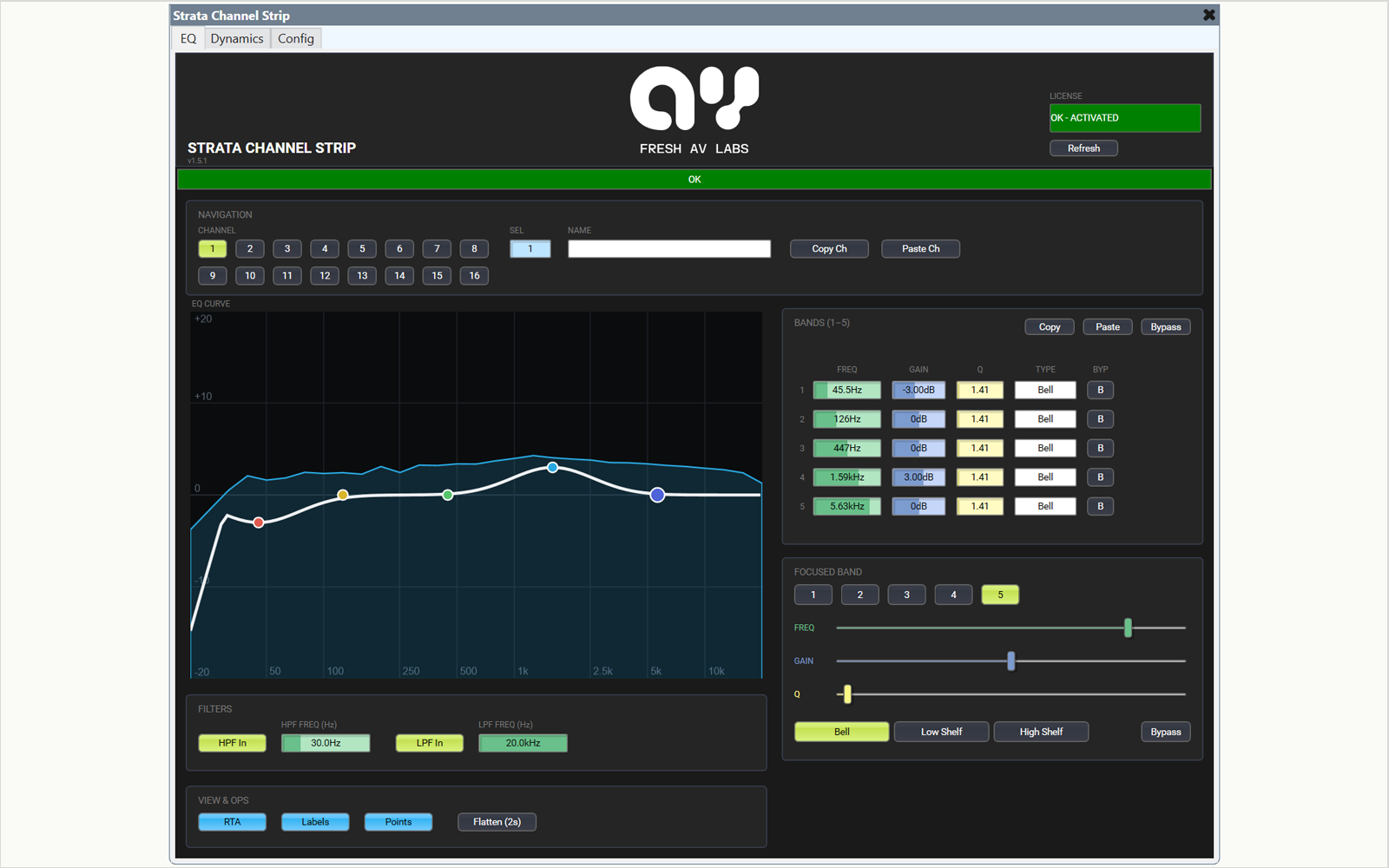
Strata gives every channel in a Q-SYS design a complete channel strip - high-pass and low-pass filters, a noise gate, parametric EQ, a compressor, and a peak limiter - compiled as native DSP inside the Core, with the visual feedback the stock blocks never had: a live EQ curve, an RTA spectrum overlay, and a dynamics transfer curve with the operating point riding it in real time.
In Q-SYS
- Up to 16 channel strips per instance; per-channel chain of HPF / LPF, gate, parametric EQ, compressor, and peak limiter, with EQ placeable pre- or post-dynamics
- Live EQ curve with color-coded band points and an RTA overlay tappable pre-EQ, post-EQ, or from an external measurement input
- Dynamics transfer curve with threshold markers, a live operating dot, and input / output / gain-reduction metering
- Multi-channel inputs: a strip processes up to 8 parallel paths - stereo pairs, zone feeds, lav sets - through one set of settings with linked dynamics
- Whole-channel and per-section copy / paste, hold-to-flatten, one-press channel bypass, and a follow-the-selection monitor bus
- Every setting is a pin: build operator UCIs around the live graphs, meters, and the focused-band strip
- Strata Strip Selector included free - a channel-by-view button grid that re-points the strip from a wall panel or UCI, with automatic discovery
Built around the graphs
Tuning a channel across separate gate, EQ, compressor, and limiter blocks means bouncing between panels with no combined picture. Strata draws the whole channel on one block: the composite EQ response including filter roll-offs, the spectrum behind it, and the input-to-output dynamics curve with the compressor's operating point on it live. The plugin animates only the graph that is on screen (your UCI tabs or the Strip Selector tell it which), so the visual feedback does not tax the Core's script engine.
One strip, many paths
Set a channel's input count to anything up to 8 and it processes the paths in parallel through the same settings: one shared dynamics detector keeps a stereo pair centered, meters follow the loudest path, and raising a count later only adds pins - existing wiring survives untouched.
Fail-safe licensing
Licensed per Core, with a full-function 10-minute demo each time an unlicensed design starts. If a demo expires, the strip drops to a clean safety bypass: audio keeps passing, unprocessed. The system never goes silent.
Specifications
| Channels | Up to 16 strips per instance |
|---|---|
| EQ | 3-8 band parametric, Bell / shelf types |
| Filters | HPF + LPF, 12-96 dB/oct slopes |
| Dynamics | Gate, compressor, peak limiter |
| Multi-channel | Up to 8 parallel paths per strip |
| Visuals | Live EQ curve, RTA overlay, dynamics transfer curve |
| Operator UI | Every setting is a pin |
| Licensing | Per-Core activation, 10-minute demo |
Compatibility
- Tested with Q-SYS Designer 10.4
- Any Q-SYS Core processor (embedded DSP - no external device)
- Ships with the free Strata Strip Selector companion plugin
Downloads
Strata Channel Strip pluginv1.5.3175.3 KB
Same filename every release - the version lives inside the plugin.
DownloadStrata Strip Selector companion pluginv1.5.343.4 KB
Free companion plugin, included with Strata.
DownloadStrata Demo Filev1.0274.5 KB
DownloadUse of these files is governed by the plugin license, demo use included.
Documentation
Read the manualChangelog
v1.5.2 - Sep 26, 2026
- Global Copy/Paste now works between strips: set it to Yes on both Channel Strips, then Copy on one and Paste on the other in the same design
- Strip Selector: the Strata Component pin reads --Select a Strata Channel Strip-- when no strip is picked, where it read an empty string before. What you must do: if your logic tests the Strata Component pin for an empty string, test it for --Select a Strata Channel Strip-- instead. To know whether the Selector drives a strip, use the Linked pin
- Strip Selector: a picked strip that is missing at startup stays picked and the status bar says so, where 1.5.1 switched to the only strip in the design. Refresh clears the pick and does not choose a strip for you, so pick the strip again. New status messages tell a failed scan and an unreachable strip apart
- Strip Selector: the status texts use a hyphen where they used an em dash, and the texts Strata '(name)' not found and '(name)' is not a Strata Channel Strip are gone. What you must do: if your logic matches the Selector's Status text, change it to the texts in the manual's Link status table
- Channel Strip: on a real Core, the LOCKING ID box no longer labels the Core's Locking ID as an emulator ID
- Channel Strip: the LICENSE box wraps long license text onto two lines instead of clipping it
- Channel Strip: the RMS (s) field on the Config page shows seconds as a number (.200), not a clock. The TIMEOUT caption drops its (s)
- Channel Strip and Strip Selector: new header with the Fresh AV Labs mark centered
v1.5.1 - Jul 17, 2026
- Strip Selector: custom row labels that clash with a reserved name, a processing-row name, another row, or contain a tilde now fall back to CUS n instead of producing duplicate or malformed pins
- Strip Selector: hardened link handling so a selection error can't leave the grid stuck
v1.5.0 - Jul 16, 2026
- Strip Selector: custom button rows (up to 4) that join the one-at-a-time grid but drive nothing on the strip - ready-made per-channel buttons for UCIs and schematic logic
- Strip Selector: Close button clears the whole grid; the linked strip stays on its current channel and view
v1.4.0 - Jul 10, 2026
- Multi-channel inputs: up to 8 parallel audio paths per strip through one set of settings
- Unified audio pin naming (Channel N Input / Output J) - raising a path count only adds pins
v1.3.0 - Jul 5, 2026
- Initial public release of the Strata pack (Channel Strip + Strip Selector)
Related plugins